
You are here:
Thank you for downloading the latest Renee Video Editor (macOS)
Please wait .
Having Trouble Opening the App on macOS?
After downloading the software, macOS may display a security warning similar to the screenshot below:
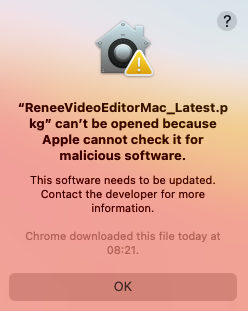
Why Does This Happen?
This warning is generated by macOS Gatekeeper security protection. In some cases, Apple cannot automatically verify the developer of an application, so macOS prevents the app from opening by default. This does not necessarily mean the software is unsafe.
Refer : https://support.apple.com/en-ca/102445
Quick Solution
- Open System Settings.
- Go to Privacy & Security.
- Scroll down to the Security section.
- Find the blocked application.
- Click Open Anyway.
- Launch the application again.
View Detailed Fix Guide
Step-by-step instructions with screenshots for macOS users.