
Convert WMA to MP3 Online: Quick & Easy

Summary
Learn how to convert WMA to MP3 online and make your files compatible with a wider range of playback devices. The editor provides step-by-step instructions in the next article.
Table of contents


CutterArbitrarily cut and clip audios in MP3, ACC, FLAC and APE formats. Many effects, such as fade in/out, speed adjustment, music mixing and volume adjustment, are available.
ConverterConvert music files between all audio formats, including MP3, M4A, ACC, OGG, AAC, FLAC and the others. It can also convert the video format into MP3.
RecorderRecord computer sounds from streaming media and microphone at the same time and output into multiple audio formats.
JoinerMerge music files into one regardless the original file formats. The output format and quality can be set, too.
CD BurnerBurn multiple music files into CD, DVD and also make APE or BIN image file.
Compatible with: Windows 11 / 10 / 8.1 / 8 / 7 / Vista / XP (32bit/64bit)
CutterArbitrarily cut and clip audios in diffrent formats. Many effects, such as fade in/out, speed adjustment, music mixing, are available.
ConverterConvert music files between all audio formats, including MP3, M4A, ACC, OGG, AAC, FLAC and the others. It can also convert the video format into MP3.
RecorderRecord computer sounds from streaming media and microphone at the same time and output into multiple audio formats.
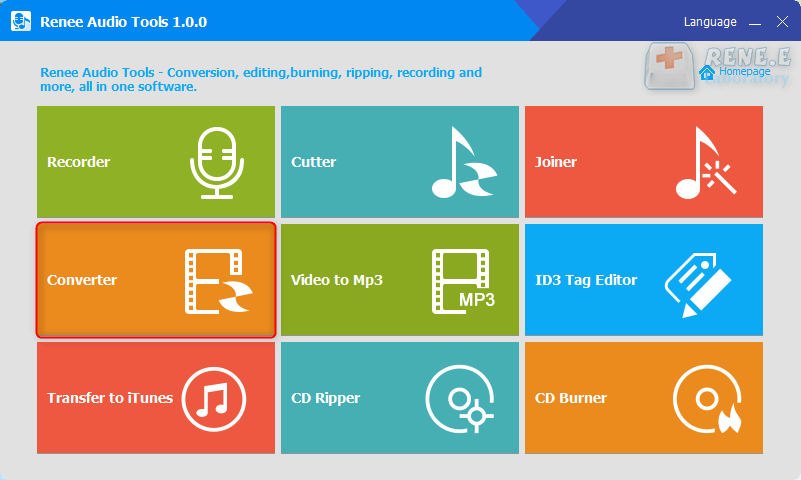
recording: Support recording computer sound and microphone sound.
cut: Support cutting audio clips, adjusting audio playback speed, adjusting sound beam and volume, etc.
Combine: Merge multiple audio files into one complete file.
Format conversion: It can realize the conversion between various audio file formats, and also provides functional modules such as cutting, adjusting speed, changing voice, mixing, and ID3 editor.
Video to MP3: Convert video to audio formats such as MP3, WAV, AAC, M4A, etc.
ID3 editor: Edit the detailed information of audio files, such as song name, artist, album, year, genre, etc.
Go to iTunes: Add audio files to iTunes.
CD separation: Extract the audio files from the CD and save them to your computer.
CD burning: Burn audio files from your computer to CD.
Relate Links :
How to Compress Audio Files Easily?

08-11-2026
John Weaver : Generally, to easily upload an audio file to the Internet, we can compress the audio file to reduce...
Audio Joiner: How to Merge Audio Files Together?
08-11-2026
John Weaver : How to combine several songs into one? Or, how can we mix songs? In this article, we will...
How to Cut Audio Files? Get these Ways!
08-11-2026
John Weaver : In our daily life, we always listen to audios. These audio files are complete but we sometimes only...


User Comments
Leave a Comment