
How to Convert MP4 Video/Audio to MP3 with VLC Media Player?

Summary
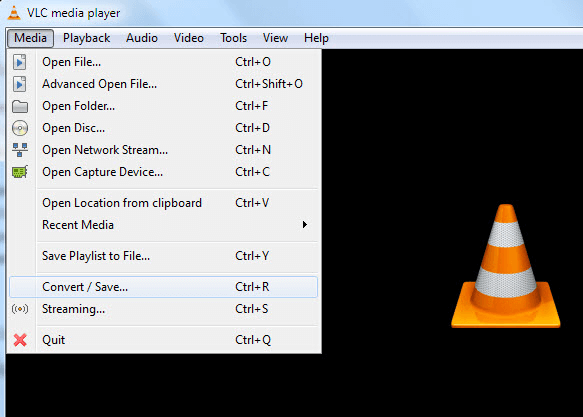
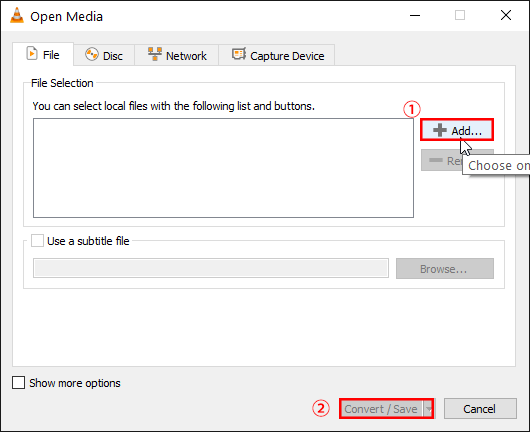
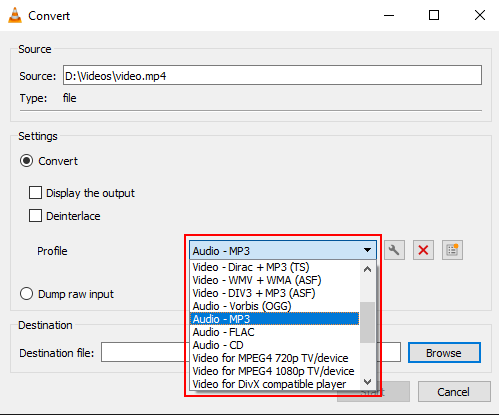
VLC is the powerful and free multimedia player which supports various audio and video decoders, and converts formats. In this essay, we will talk about how to convert MP4 Video/Audio files to MP3 with VLC Media Player. Let’s read together!


Screen RecordingRecord screen and webcam in Windows computer.
Cut Videos & AudiosUsers are free to cut videos and audios clips with setting start and end time.
Multiple Edit ToolsMerge, crop, rotate, cut and transform video easily. Change and add background music, subtitles and remove watermark from video.
Format ConversionSupport to convert videos and audios into different formats.
Screen Recording Record screen and webcam in Windows computer.
Multiple Edit ToolsCut Videos & Audios Users are free to cut videos and audios clips with setting start and end time.
Multiple Edit ToolsMerge, crop, rotate, cut and transform video easily. Change and add background music, subtitles and remove watermark from video.
Format ConversionSupport to convert videos and audios into different formats.
Relate Links :
Convert PPT to MP4: The Ultimate Guide

09-11-2026
Amanda J. Brook : Learn how to convert PPT to MP4 video format and edit it using Renee Video Editor Pro for...
How to Effortlessly Convert MP4 to WEBM in Windows?
09-11-2026
Amanda J. Brook : Learn how to convert MP4 files into WEBM files in Windows and explore the benefits of using the...
Video Resolution Converter: Simplify Your Life
09-11-2026
Amanda J. Brook : A professional video resolution converter can resolve issues like black borders, stretching, and blurred content caused by inconsistency...
09-11-2026
Jennifer Thatcher : Easily convert 3GP files to MP3 format with user-friendly software. Drag and drop files, choose output format, and...


User Comments
Leave a Comment